
Product knowledge
Docs
Gateway Architecture
See how Raptor MCP Gateway runs inside an organization's approved domain between customer AI tooling, security controls, gateway services, and customer-approved Qlik access.
Overview
Raptor MCP Gateway is the controlled bridge between an organization's approved AI tooling and its customer-approved Qlik access.
This view is intentionally limited to the organization's domain and security boundary.
Architecture diagram
The diagram shows the organization's users, AI environment, security controls, customer-hosted Raptor MCP Gateway runtime, Qlik credentials, audit/event logging, and approved Qlik endpoints.
Architecture view
Raptor MCP inside the organization domain
This architecture view shows the customer-hosted Raptor MCP Gateway as the controlled bridge between approved AI tooling and customer-approved Qlik access inside the organization's security boundary.
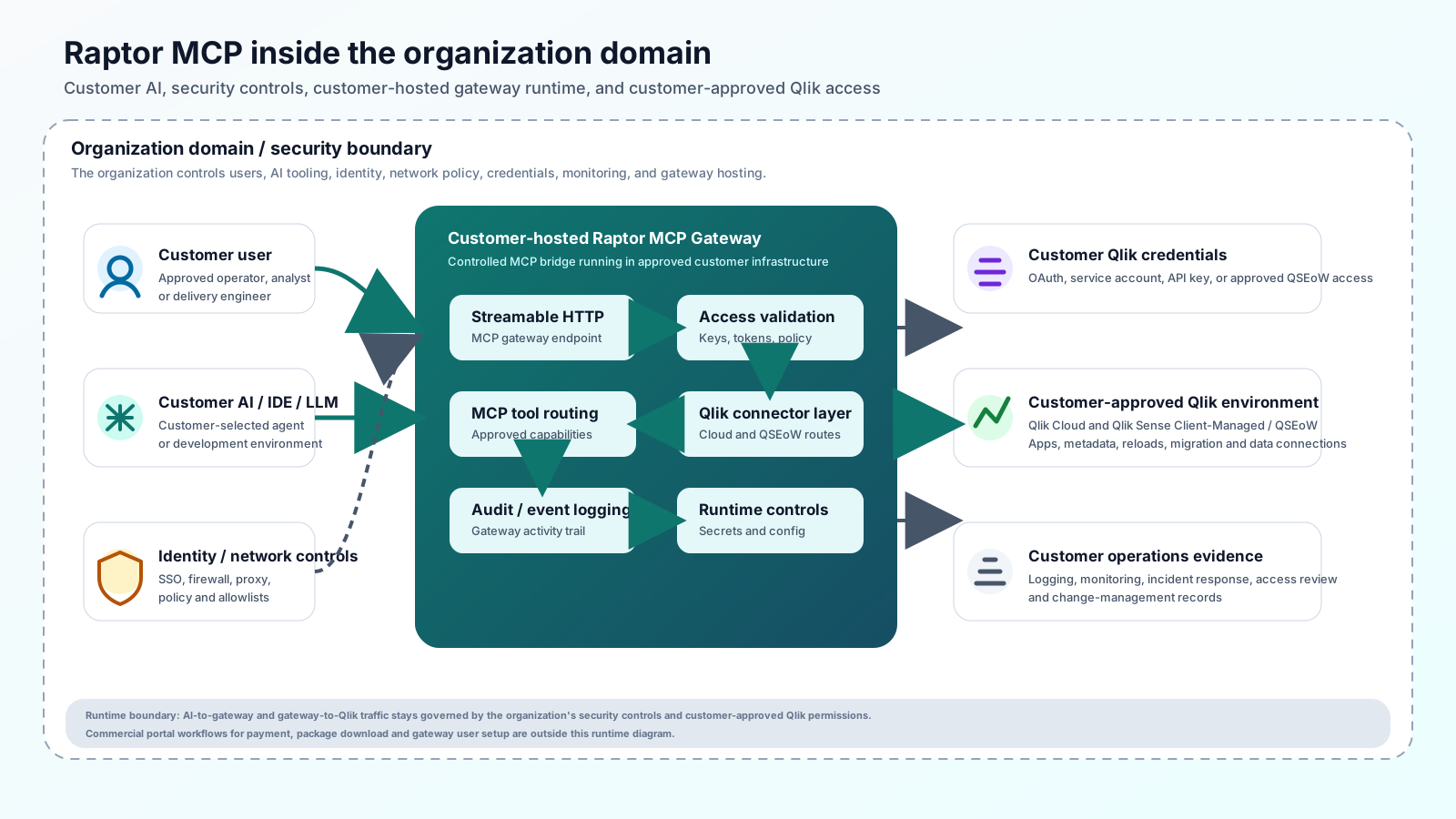
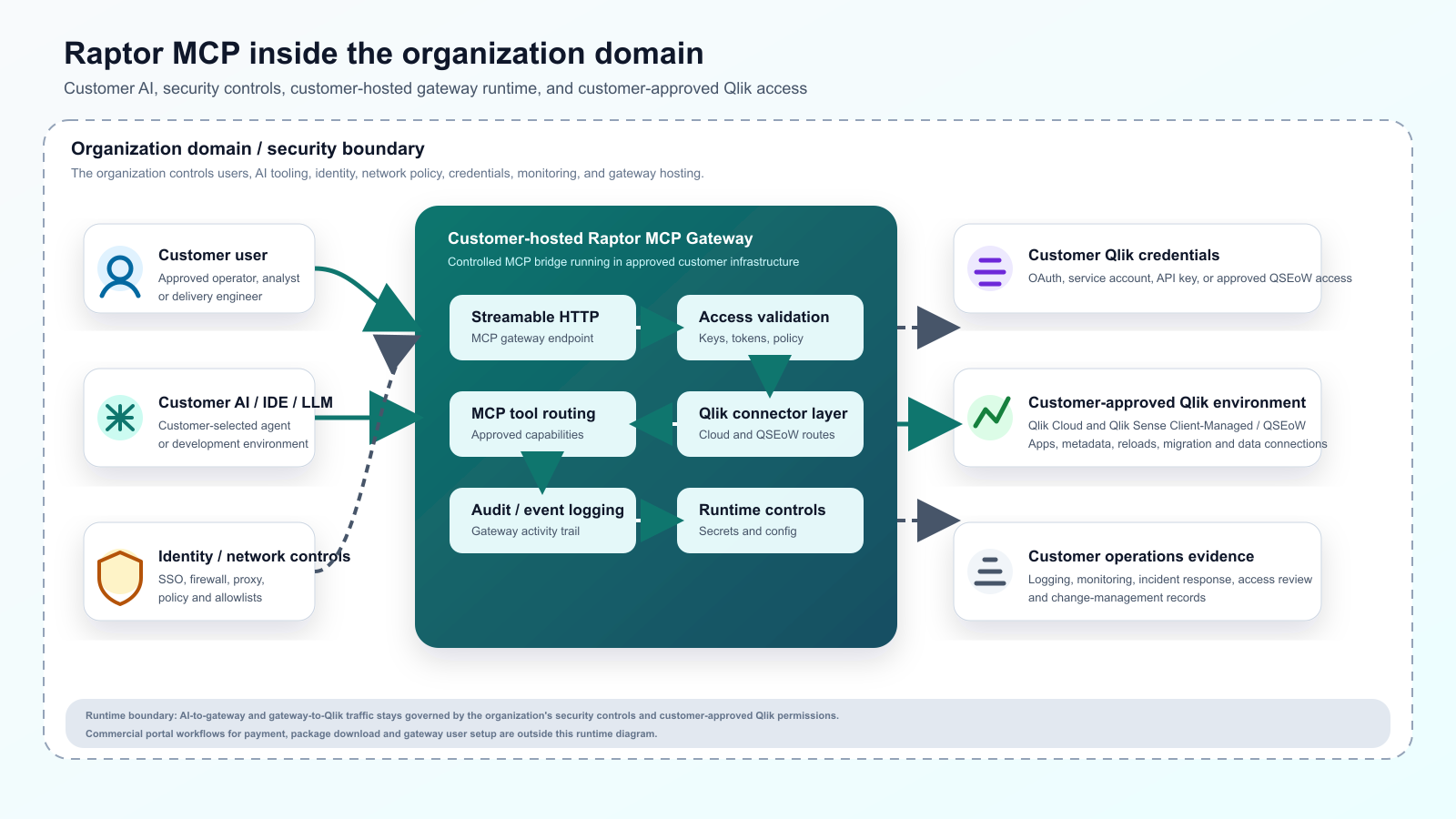
Organization domain / security boundary
The organization controls users, AI tooling, identity, network policy, gateway hosting, credentials, and operational logs.
- Customer user
- Customer AI / IDE / LLM
- Identity, network and security controls
- Customer Qlik access credentials / service account / OAuth
- Customer logging, monitoring and incident response
Customer-hosted Raptor MCP Gateway
The gateway validates access and routes approved MCP capabilities through the Qlik connector layer.
- Streamable HTTP Gateway
- Access key / token validation
- Policy / entitlement check
- MCP tool routing
- Qlik connector layer
- Audit / event logging
Customer-approved Qlik environment
The customer's Qlik estate remains governed by customer-approved Qlik permissions.
- Qlik Cloud
- Qlik Sense Client-Managed / QSEoW
- Qlik apps
- Qlik data connections
- Qlik automation / migration / metadata operations
Approved AI-to-gateway route
Customer AI / IDE / LLMCustomer-hosted Raptor MCP Gateway
Qlik MCP capability routing
Customer-hosted Raptor MCP GatewayQlik Cloud and QSEoW
Customer-approved Qlik access
Qlik connector layerCustomer Qlik access credentials / service account / OAuth
Operational evidence
Audit / event loggingCustomer logging, monitoring and incident response
Customer-hosted gateway
Customers may run the Raptor MCP Gateway inside their own approved infrastructure. In this model, the customer controls network access, Qlik connectivity, credentials, AI tooling, logging, monitoring and security policies.
Security and data boundaries
Security ownership stays aligned to the selected gateway route and the customer's approved Qlik access model.
- Customer AI/LLM remains in the customer's chosen environment.
- Customer controls Qlik credentials and access rights.
- Gateway access is entitlement-controlled.
- Audit/event logging routes to the organization's approved logging, monitoring and incident response process.
- Any customer-provided content or evidence is processed only under the applicable approved process, terms and privacy notices.
Qlik connectivity
The gateway connects to Qlik using the customer-approved Qlik access method, such as Qlik Cloud API/OAuth/service account configuration or Qlik Sense Client-Managed/QSEoW connectivity. Access must be configured and approved by the customer.
Qlik Cloud, Qlik Sense and related marks are trademarks of QlikTech International AB or its affiliates. Raptor MCP is an independent Modern Management gateway-access platform and is not owned, operated, endorsed or sponsored by Qlik.
Customer AI / BYO AI model
Raptor MCP does not require customers to move their AI tooling into Modern Management infrastructure. Customers may use their own AI, IDE or LLM environment, subject to their own security, cost and governance controls.
Gateway operations
Gateway operations should follow the organization's normal controls for service hosting, secret management, network allowlists, log retention, monitoring, incident response, change management, and access review.
Commercial portal dependencies
The commercial portal is outside the runtime architecture diagram. It is still required for payment/subscription administration, gateway deployment package download, and the administrative setup needed to manage users within the gateway for on-premises or cloud-hosted gateway routes.
Runtime AI-to-gateway and gateway-to-Qlik traffic remains governed by the configured gateway route, customer-approved Qlik permissions, and the organization's security controls.
- Payment and subscription status for the Raptor MCP gateway entitlement.
- Download access for the gateway deployment package and approved supporting materials.
- Administrative user setup for gateway access when the gateway is customer-hosted on-premises or cloud-hosted.
Setup prerequisites
Prepare these items before connecting a production Qlik environment through Raptor MCP Gateway.
- Approved customer-hosted gateway route.
- Qlik Cloud or Qlik Sense Client-Managed / QSEoW environment.
- Customer-approved Qlik access credentials / OAuth / service account.
- Customer AI / IDE / LLM environment.
- Network access from gateway to Qlik endpoint.
- Approved secret store for Qlik credentials and gateway access keys.
- Approved logging, monitoring and incident response process.
FAQs
Does Raptor MCP host my AI? No. Customers may use their own approved AI, IDE or LLM environment. Raptor MCP provides governed gateway access to Qlik workflows.
Does Raptor MCP store my Qlik production data? Customer Qlik data access is controlled by the customer-approved gateway and Qlik permissions.
Can the gateway run in my environment? Yes. Customers may run a customer-hosted gateway where they have suitable infrastructure and security approvals.
Related guides
Previous
Raptor MCP
Next